Alabaster gets an index, and other news.
The newest version:
- Added substantial new conversation by several collaborators.
- Added more diagnostic verbs. There is now a REVIEW SUBJECTS command that lists every subject with valid quips associated, and also REVIEW (some specific topic) that will list just the quips associated with that topic. In the list, quips that have already been used are marked with an X, and those that are not yet available are marked with a *.
- Moved the “what subjects does this mention” question until *after* the collaborator has composed the text of the player character’s quip, allowing more flexibility if you change your mind as you write about exactly what you want to say.
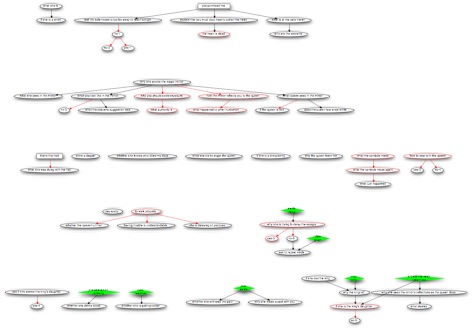
- Created a rudimentary sort of index of conversation produced — it’s not, of course, actually built into the IDE like Inform’s real indices are, but it may be useful anyway. The way it works is that Alabaster can convert its conversation model to .dot format, which specifies a directed graph. This can then be fed into GraphViz or, in my case, OmniGraffle Pro, and produce a chart. The chart is linked from the game page now, so you can have a look as you go along. Facts are green diamonds; quips are ovals or boxes. (Boxes are ones that have to be brought up by the NPC and cannot be triggered by the player.) Quips that are red are restrictive, meaning that they can only be answered by another quip that directly follows them. Red arrows indicate a direct following relation, rather than indirect following. Right away, looking at the chart revealed a couple of bugs — things where I’d misedited the code and quips were following the wrong things. It is also informative about flow. If there’s a red oval that has no red lines coming out of it, that means that that’s a point where the conversation will get stuck — because it’s a restrictive quip that has no acceptable follow-ups. Anyway, if you’d like to play with this yourself, type BUILD DOT in the game and then copy the splurge of output into a text file and feed it into your graphing program of choice. (This is inelegant, but it’s a prototype. Elegance will come later. Also, if you’re actually good at GraphViz and want to make suggestions about improving the visual presentation style, I am happy to hear.)
 Emily Short's Interactive Storytelling
One thought on “Alabaster, continued”